
What is CalcSolver
CalcSolver is a free online calculator and educational math resource. It runs directly inside your web browser on any device—laptop, tablet, or smartphone. The platform serves students, teachers, and professionals who need quick answers. It handles basic arithmetic, square roots, fractions, percentages, and algebra concepts.
Arcade Vault (100+ Games)
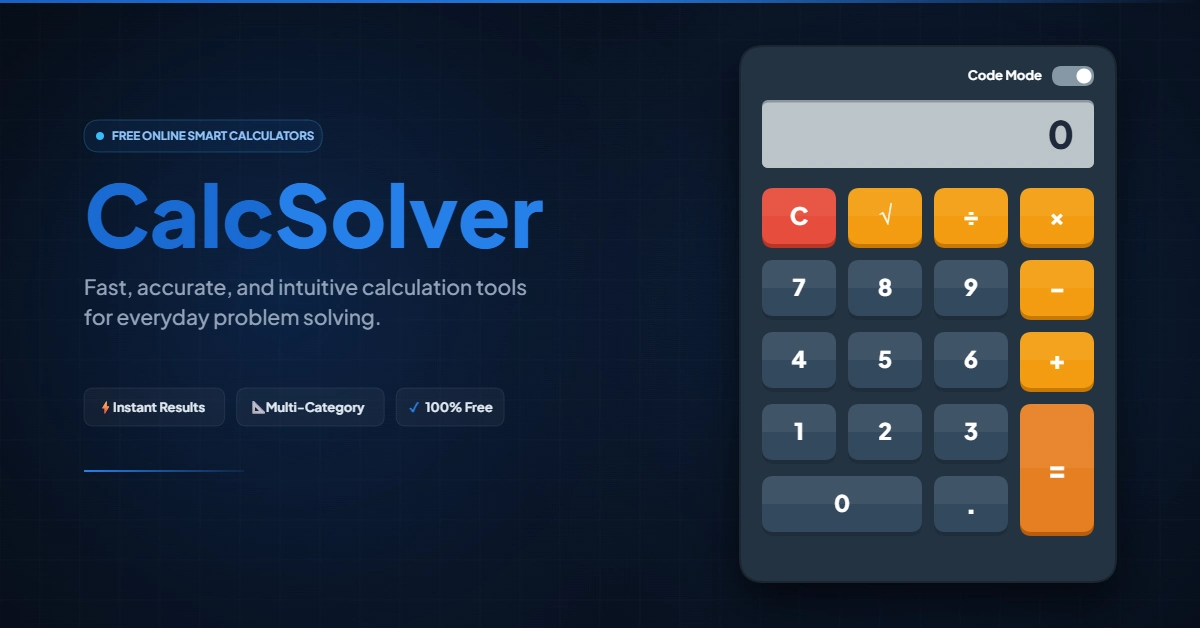
Unlike heavy graphing software or paid statistics tools, CalcSolver focuses on practical, everyday math. The interface mimics a physical desktop calculator with a retro digital display and tactile buttons.
Here’s the key difference: all calculations happen inside your device’s memory. This is called client-side execution. Your numbers never travel across the internet to a remote server.
What are the Core Features of CalcSolver?
The platform groups mathematical operations into a simple, color-coded button layout.
The Output Screen
The top panel shows your entries and results using a high-contrast digital font. It gives instant visual feedback as you press buttons. You’ll see whole numbers, decimals, or error messages.
Clear Key (C)
The red Clear button resets everything. Press it before starting a new problem. This wipes your current input and returns the screen to zero.
Square Root Key (√)
The square root button finds the principal non-negative radical of your number. Enter 144, press √, and you get 12 instantly.
Basic Arithmetic Operators (÷, ×, -, +)
These orange keys handle the four pillars of math: division, multiplication, subtraction, and addition.
Decimal Key (.)
The decimal button lets you input fractional values. Use it for money, measurements, and unit rates.
Equals Key (=)
The vertical execution key completes your equation and shows the final result.
How to Use CalcSolver: Step-by-Step Instructions
Follow these steps to solve daily math problems accurately.
Step 1: Clear the Memory
Tap the C button before starting. Check that the screen reads 0.
Step 2: Enter Your First Number
Type your starting value using the number keys. For decimals, tap the . button where needed.
Step 3: Choose Your Operation
Press the symbol for your math operation:
- Tap + to add values
- Tap – to find the difference
- Tap × to multiply
- Tap ÷ to divide
Step 4: Enter the Second Number
Type the second value. The display updates to show your new entry.
Step 5: Press Equals
Hit the = button to finish. The answer appears on screen immediately.
Step 6: Chain More Operations
Need to continue calculating? Tap an operator (+, -, ×, ÷) right after getting your total. The calculator keeps your running total and applies the new operation.
CalcSolver vs. Other Calculator Tools
Different math tasks need different tools. Here’s how CalcSolver compares:
| Feature | CalcSolver | Physical Calculator | Smartphone App | Spreadsheet Software |
| Startup Speed | Instant in browser | Instant if nearby | Requires phone unlock | Slow program launch |
| Cost | Free | $10–$120+ | Free with phone | $70+ yearly license |
| Battery Needed | No | Yes (AAA or solar) | Drains phone battery | Uses computer power |
| Learning Curve | Very low | Low to moderate | Low | High (formula syntax) |
| Screen Size | Large, high-contrast | Small, reflective | Compact touchscreen | Multi-cell grid |
| Best For | Daily math, homework | Proctored exams | Quick on-the-go math | Large data sets |
Math Concepts Covered by CalcSolver
Beyond basic arithmetic, CalcSolver provides reference content for school-level math.
Basic Algebra
Algebra powers financial modeling, engineering, and programming. The platform covers foundational formulas.
The Polynomial Remainder Theorem: When you divide a polynomial f(x) by (x – a), the remainder equals f(a). This lets you find remainders without full long division.
- General form: f(x) = (x – a) · q(x) + R
- Core rule: R = f(a)
Factoring Polynomials: Factoring breaks complex expressions into simpler ones that multiply together. The difference of squares identity is a common example:
a² – b² = (a – b)(a + b)
Factoring helps students find roots (x-intercepts) of quadratic equations quickly.
Percent and Decimal Conversions
Converting fractions to decimals and percentages matters for sales tax, discounts, and interest rates. A fraction represents part of a whole: the numerator divided by the denominator.
- Decimal = Numerator ÷ Denominator
- Percentage = Decimal × 100
Here’s a reference table for common fractions:
| Fraction | Decimal | Percentage | Real-World Example |
| 1/2 | 0.5 | 50% | Half-price sales |
| 1/3 | 0.3333… | 33.33% | Splitting a bill three ways |
| 1/4 | 0.25 | 25% | Quarter hour (15 minutes) |
| 1/5 | 0.2 | 20% | Standard tip rate |
| 3/5 | 0.6 | 60% | Passing grade threshold |
| 5/8 | 0.625 | 62.5% | Socket sizing |
| 3/4 | 0.75 | 75% | Fuel gauge estimate |
| 7/8 | 0.875 | 87.5% | Engineering tolerances |
Equivalent Fractions
Equivalent fractions show the same value with different numbers. You create them by multiplying or dividing both the numerator and denominator by the same non-zero integer.
a/b = (a × n) / (b × n) where n ≠ 0
For example, fractions equivalent to 3/4:
- Multiply by 2: 6/8
- Multiply by 3: 9/12
- Multiply by 4: 12/16
Spotting equivalent fractions makes adding and subtracting fractions with different denominators easier.
Everyday Uses for Online Calculators
Online calculators aren’t just for classrooms. Here are practical scenarios where CalcSolver helps.
Shopping and Discounts
Retail promotions often feature percentage discounts like “Take an extra 25% off.” Calculate your actual cost before checkout:
- Item price: $80.00
- Discount: $80 × 0.25 = $20.00
- Final price: $80 – $20 = $60.00
Kitchen Conversions and Recipe Scaling
Baking requires accurate ratios. If a bread recipe for four people needs 2.5 cups of flour, scaling for ten guests means:
- Scale factor: 10 ÷ 4 = 2.5
- New flour amount: 2.5 × 2.5 = 6.25 cups (or 6¼ cups)
Home Improvement and Material Sizing
Calculating square footage prevents overspending on flooring, paint, or tiles.
- Room size: 14 feet by 18 feet
- Area: 14 × 18 = 252 sq. ft.
- Add 10% for waste: 252 × 1.10 = 277.2 sq. ft. needed
Travel and Fuel Efficiency
Track gas mileage without complex apps:
- Trip distance: 340 miles
- Fuel added: 11.2 gallons
- Miles per gallon: 340 ÷ 11.2 = 30.35 MPG
Technical Performance and Safety
Lightweight browser calculators offer real advantages.
Client-Side Execution
The calculation engine runs via local JavaScript on your device. When you tap numbers, your device handles the math directly. Results appear with zero lag because data doesn’t travel to external servers.
Working Offline Once Loaded
Modern browsers cache the calculator’s code. If your internet drops at a coffee shop or job site, the calculator keeps running.
Privacy and Data Security
People often calculate sensitive numbers like income, tax deductions, or business margins. Client-side tools run in your browser’s isolated sandbox. Your private numbers never get recorded on external database servers.
The Order of Operations: PEMDAS Explained
Calculators follow standard algebraic logic to avoid confusion. The global standard is PEMDAS (or BODMAS in British English):
- Parentheses (Brackets)
- Exponents (Orders/Roots)
- Multiplication and Division (left to right)
- Addition and Subtraction (left to right)
Why Order Matters
Consider: 6 + 2 × 5
If you calculate left to right without rules: 6 + 2 = 8, then 8 × 5 = 40. That’s wrong.
Under PEMDAS:
- First, multiply: 2 × 5 = 10
- Next, add: 6 + 10 = 16
This hierarchy ensures multi-step problems return correct answers.
Why Choose Web Calculators Over Physical Hardware?
Physical calculators served offices for decades. Web-based tools offer distinct advantages today:
- No Hardware Clutter: Physical calculators take desk space. Browser tools open in a tab alongside your work.
- Zero Battery Replacements: Traditional calculators die from dead batteries. Browser tools use your computer’s power.
- Better Screen Readability: Web calculators use modern displays with clean contrast and large digits.
- Cost Free: Web utilities eliminate the need to buy classroom electronics for simple homework.
Conclusion
CalcSolver delivers reliable math utility for students, professionals, and homeowners. It pairs core arithmetic controls with educational guides on fractions, decimals, and algebra. The result: daily problem-solving becomes fast and frictionless.
Frequently Asked Questions
1. Is CalcSolver free to use?
Yes, CalcSolver is completely free in any standard desktop or mobile browser.
2. Do I need an account?
No account, email, or registration is required.
3. Can I use it offline?
Yes, once the page loads, the math runs locally on your device.
4. How does the square root key work?
Type a number and press √. The calculator shows the non-negative principal square root.
5. What does “C” stand for?
C means “Clear.” It resets the memory and returns the display to 0.
6. Can CalcSolver convert fractions to decimals?
Yes. Divide the numerator by the denominator (e.g., 3 ÷ 4 = 0.75).
7. Does it store my calculation history?
No. Calculations run privately in your browser and aren’t saved on remote servers.
8. Does it work on smartphones?
Yes. The responsive design adapts to iPhone and Android touch screens.
9. Why do I see an “Error” message?
Errors appear for impossible operations, like dividing by zero or finding the real square root of a negative number.
10. How do I calculate a percentage discount?
Multiply the original price by the discount as a decimal. For 20% off $50: 50 × 0.20 = $10 discount.
Suggested Meta Description (24 words)
CalcSolver is a free browser calculator for arithmetic, square roots, and percentages. Learn features, step-by-step solutions, and practical uses for daily math.